Aulietta: Elegant Script Font for Web Design
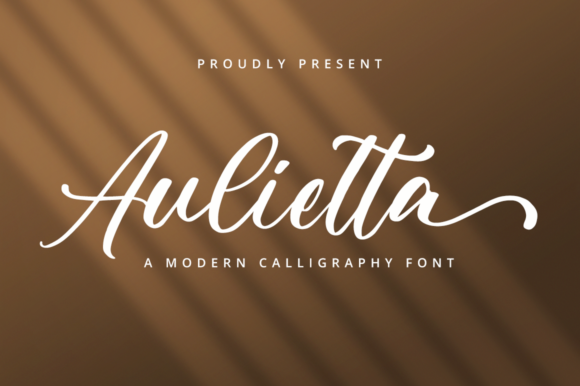
Aulietta is a delicate, flowing handwritten font that brings an authentic, elegant feel to digital design. As a web designer, I appreciate how it adds character without sacrificing clarity. Its script style makes it ideal for headers, logos, and decorative elements where visual appeal matters.
When working on landing pages or social media graphics, Aulietta stands out as a premium font that enhances brand identity. It works well in hero sections, call-to-action buttons, and short phrases where a personal touch is needed. Its organic strokes and soft curves give it a humanized quality that feels approachable and artistic.
Using Aulietta in Digital Layouts
For website headers and section titles, Aulietta creates a strong visual hierarchy. Its unique shape draws attention without overwhelming the reader. Pairing it with a clean sans serif font like Open Sans or Lato helps balance the design, making the overall layout more readable and professional.
In online stores, Aulietta can be used for product banners or promotional text. It adds a touch of sophistication that aligns with boutique or artisanal brands. For example, a handmade jewelry store could use Aulietta in their banner text to highlight a special collection, creating a sense of exclusivity and craftsmanship.
On coaching websites or course sales pages, Aulietta can reinforce a personal connection. Using it for headlines or key benefits gives the content a warm, inviting tone. It’s especially effective when paired with bold, modern typography for body copy, ensuring the message remains clear and easy to scan.
Readability and Responsive Design
While Aulietta is a decorative display font, it maintains good readability at larger sizes. On desktop screens, it works well for headings and subheadings. However, on mobile devices, it’s best to limit its use to short phrases or logos. When used in small text, such as button labels or footnotes, it may become less legible.
For dark backgrounds or image overlays, Aulietta benefits from high contrast. Using a light color like white or off-white ensures the text remains visible and easy to read. On light backgrounds, a slightly darker shade of gray can help it stand out without being too harsh.
When designing responsive layouts, consider using Aulietta only for non-critical text. For example, use it for a main headline but switch to a simpler font for the supporting content. This approach keeps the design balanced and accessible across all device sizes.
Brand Identity and User Engagement
Aulietta contributes to a brand’s visual personality by adding a handcrafted, artistic flair. It’s particularly useful for creative industries like fashion, art, or lifestyle branding. Its elegance can convey professionalism while maintaining a friendly, approachable vibe.
When used consistently across a website, Aulietta helps build a cohesive online identity. It reinforces the brand’s tone and values, making the experience more memorable for users. This consistency also improves trust, as it signals attention to detail and thoughtful design choices.
For digital ads or social media graphics, Aulietta can make a strong impression. It’s perfect for eye-catching headlines or taglines that need to stand out quickly. However, avoid overusing it in long paragraphs, as it may reduce readability and user engagement.
Font Pairing and Style Options
Pairing Aulietta with a simple sans serif font creates a clean, modern look. This combination works well for landing pages, portfolio sites, or blog headers. The contrast between the two fonts adds depth and visual interest without cluttering the design.
If you’re going for an editorial or magazine-style design, pairing Aulietta with a serif font like Georgia or Merriweather can create a classic, refined aesthetic. This pairing is ideal for content-heavy websites or blogs that prioritize readability and a polished appearance.
Check the available styles and file formats before using Aulietta. Most script fonts come in multiple weights or alternates, which can add versatility to your design. Ensure the font supports the languages and characters needed for your project, especially if targeting international audiences.
Commercial Licensing and Usage
When using Aulietta for client projects, online stores, or digital templates, always verify the commercial license. Some fonts require separate licensing for web use or resale, so it’s important to understand the terms before integrating them into your work.
For SaaS founders or online store owners, Aulietta can enhance the visual appeal of your platform without compromising functionality. Use it sparingly in key areas like headers, logos, or CTAs to maintain a clean, professional look.
As a digital product creator, I rely on fonts like Aulietta to elevate the design of my work. Its blend of elegance and practicality makes it a valuable addition to any design toolkit. Whether you're building a creative portfolio or launching a new brand, Aulietta offers a stylish way to express your vision.